
 By Admin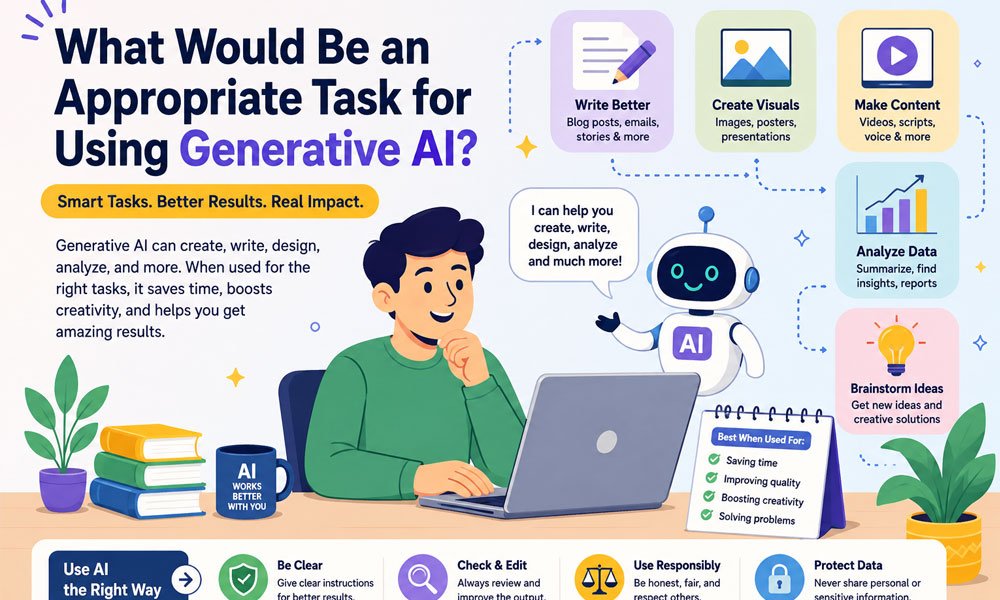
Think about how much time you spend writing emails, reading long reports, finding ideas, or doing the same small tasks again and again. What if AI could help you finish some of this work in minutes?
That is already happening in 2026. People use generative AI to write first drafts, summarize documents, create images, explain topics, help with code, and organize information. Businesses also use it to help workers handle common tasks faster.
But AI is not the right choice for every job. Some tasks are easy and safe to give to AI. Other tasks need human skill and careful review. So, what would be an appropriate task for using generative AI? In this guide, we will look at the best tasks for AI, how they work, where they can save time, and where people still need to stay in control.
What Would Be an Appropriate Task for Using Generative AI?
An appropriate task for generative AI is usually one that involves creating, changing, explaining, or organizing information. Writing an email is a simple example. You can tell AI what the email should say. It can create a first draft in seconds. You can then read it, fix anything you do not like, and send the final version yourself.
Other good examples include writing article drafts, creating product descriptions, summarizing reports, brainstorming ideas, translating text, and helping with basic code. These jobs have something important in common. A person can usually check the result before it is used.
This gives us a simple answer to what would be an appropriate task for using generative AI. A good task is one where AI can save time and a mistake can be found and fixed without causing serious harm. AI can do the first part of the work, while a person checks the final result.
For example, imagine a shop owner who needs descriptions for 200 products. Writing every description by hand could take days. AI can create the first drafts much faster. The owner can then compare each description with the real product details before publishing it.
What Makes a Task Good for Generative AI?
A good AI task should have a clear goal. If you tell the AI exactly what you need, it has a better chance of giving you something useful. A request such as “write a short email thanking a customer for their order” is much clearer than simply saying “write something for my customer.”
The next thing to think about is how easy the result is to check. Imagine asking AI to shorten a paragraph that you wrote. You already have the original text. This makes it easy to see if the new version keeps the same meaning. If something looks wrong, you can change it.
The risk of a mistake also matters. A weak blog title can simply be replaced. A wrong medical or legal answer can have much bigger effects. This is why generative AI is often best used as an assistant. It can create a draft or suggestion, but a person should remain responsible when the result really matters.
A useful question is: Can I easily spot and fix a mistake before it causes a problem? If the answer is yes, the task may be a strong fit for generative AI.
Best Tasks for Using Generative AI
Many everyday tasks are a good match for generative AI. Writing is one of the clearest examples. AI can create first drafts of emails, articles, reports, social posts, ads, and product descriptions. It can also rewrite text to make it shorter, clearer, or easier to understand.
Summarizing is another useful task. Imagine receiving a 30-page report when you only need the main points. Generative AI can help create a shorter version. You can then return to the original report to check any important details. This can save a lot of reading time.
Brainstorming is also a strong use. Maybe you need 20 blog ideas but can only think of three. AI can quickly suggest more. You do not have to use every idea. Instead, you can choose the best ones and improve them yourself.
Other suitable tasks include translation, basic coding help, spreadsheet formulas, organizing notes, explaining difficult ideas, and turning unstructured information into a clean format. The best use is often not “AI does everything.” It is AI starts the work and a person improves or checks it.
Using Generative AI for Writing and Content
Writing is one of the most common answers when people ask what would be an appropriate task for using generative AI. AI is very good at creating a starting point from simple instructions.
For example, a marketing worker may need five headline ideas for a new campaign. A blogger may need an article outline. A business owner may need a friendly email for customers. Instead of starting with a blank page, they can ask AI to create a first version.
Generative AI can also change existing writing. It can make a long paragraph shorter. It can turn difficult words into simple ones. It can change a formal message into a friendlier version. It can also organize messy notes into clear sections.
However, the final review still matters. AI can sometimes add a wrong fact, misunderstand a request, or write something that sounds right but is not true. Names, dates, numbers, quotes, and important claims should be checked before publishing.
Think of AI as a writing helper. It can help you get started and work faster. You still decide what stays, what changes, and what is ready for readers.
Using Generative AI for Summaries and Research
Long documents can take a lot of time to read. Generative AI can help by turning them into shorter summaries. You might use it with a meeting transcript, report, set of notes, policy document, or other long text.
This works especially well when AI has the original material in front of it. You can ask it to find the main ideas, important dates, action items, or key points. You can then check those details against the source. This makes the result easier to verify.
AI can also help at the start of research. It can suggest questions to explore, organize information into groups, compare ideas, or help create search terms. If you have several reports, it may help show where they agree and where they are different.
But there is an important rule. AI can help you find and understand evidence, but AI should not become the evidence. Important quotes, studies, names, numbers, and sources need to be checked. Generative AI can sometimes create information that sounds real even when it is wrong.
In 2026, some AI tools can search the web or work with uploaded files and trusted databases. That can make research more useful. Still, access to information does not mean every answer is correct. The original source remains important.
Using Generative AI for Coding and Data Tasks
Coding is another area where generative AI can save time. Developers can use AI to create simple code, explain what a piece of code does, suggest ways to fix a bug, write basic tests, or create documentation.
One reason coding can work well with AI is that much of the output can be tested. A developer can run the code and see what happens. If it fails, they can fix the problem or ask AI for another approach. This creates a useful check between the generated answer and the real result.
Generative AI can also help with data tasks. It may turn messy notes into a table, pull names and dates from text, group customer comments by topic, or help create spreadsheet formulas. These tasks can remove a lot of repetitive work.
Still, checking matters. AI may miss a row, change a value, combine two pieces of information, or produce code with a hidden problem. Important data should be checked against the original source. Code should also be tested before it is used in a real system.
Extra care is needed with passwords, payment systems, private customer data, security code, and other sensitive work. AI can assist with these areas, but important changes should not be trusted simply because the generated answer looks professional.
Using Generative AI for Business Tasks
Businesses can use generative AI in many simple ways. A marketing team can create first drafts for campaigns. A sales worker can draft a follow-up email. A customer support team can prepare answers based on approved company information. HR teams can use AI to help draft training material or job descriptions.
Product descriptions are another clear example. Imagine an online store with thousands of items. Writing every description from the beginning takes a huge amount of time. AI can create first drafts from trusted product information. A person can then check the details before they go live.
Generative AI can also summarize internal reports, organize meeting notes, prepare simple proposals, and turn long documents into shorter updates. These jobs can save workers time without giving AI full control over an important decision.
This is where the answer to what would be an appropriate task for using generative AI becomes very practical. The strongest business use cases often have a simple pattern: AI handles repetitive work, while people handle approval, judgment, and important decisions.
That line becomes even more important as businesses connect AI to other tools. An AI system might be able to prepare a customer reply, update a document, or suggest an action. But preparing an action is not always the same as taking it.
What Tasks Are Not Appropriate for Generative AI?
Generative AI can do many useful things. But some jobs should not be left to AI alone. This is most important when a wrong answer could affect someone’s health, money, rights, job, or safety.
Medical diagnosis is a good example. AI can help explain general health information or organize notes. But it should not replace a trained doctor. The same rule applies to legal advice. AI can help summarize a contract or explain common legal words. A trained legal expert should check important legal advice and decisions.
Money decisions also need care. AI can help organize financial information or explain basic terms. But it should not make an important investment choice for you. The same is true for hiring, safety work, and important company rules.
So, what would be an appropriate task for using generative AI in a high-risk field? The safer choice is often a support task. AI can draft, summarize, organize, or find information. A qualified person should make the important final decision.
How to Check if a Generative AI Task Is Safe
Before giving a job to AI, ask one simple question: Can I check the answer easily? If you can compare the answer with a trusted document, test, rule, or source, the task may be a good fit.
Next, think about what happens if AI gets it wrong. Imagine asking AI for ten headline ideas. A poor headline is easy to remove. Now imagine using an AI answer to make an important legal or money decision. The cost of a mistake can be much higher.
You should also ask if AI has the information it needs. Some AI tools in 2026 can search the web, read files, or connect with other tools. This can help, but access does not always mean accuracy. The information still needs to come from a trusted source.
Finally, ask whether you can undo the action. Drafting an email is easy to reverse because you can edit or delete the draft. Letting AI send thousands of emails on its own is very different. A good rule is to keep human approval before actions that are hard to undo.
Risks of Using Generative AI
One well-known risk is an AI “hallucination.” This means AI may give information that sounds correct but is actually wrong or made up. It might give a wrong date, invent a source, or mix two facts together.
This is why a polished answer should not always be treated as a correct answer. AI is designed to create useful responses. It can still make mistakes. Important facts, numbers, quotes, names, and sources should be checked before they are used.
Bias is another risk. AI learns from large amounts of information. Some of that information can contain unfair ideas or poor examples. This means people should review AI output, especially when it may affect another person.
Privacy matters too. Do not put passwords, private customer records, secret company information, or other sensitive data into an AI service unless you know the service is approved for that type of information. A task can be perfect for AI and still be wrong for a certain AI tool because of the data involved.
How to Use Generative AI Responsibly
Responsible AI use starts with human review. You do not need to distrust every AI answer. You simply need to check the parts that matter. If AI writes a fun list of party ideas, a quick look may be enough. If it summarizes an important business report, you should check the key facts against the report.
Clear prompts also help. Tell the AI what you need, who the content is for, and what rules it should follow. Instead of saying, “Write about our product,” you could say, “Write a short product description for new customers using only the facts below.” The second request gives AI a clearer job.
Businesses should also decide what their AI systems are allowed to do. An AI assistant may be allowed to draft a customer reply but not send it. It may prepare a refund request but not approve the payment. It may suggest a code change but not put that change into a live system.
This is an important part of understanding what would be an appropriate task for using generative AI. The task is not the only thing that matters. We also need to think about the data, the risk, the person checking the work, and what the AI is allowed to do next.
Future of Appropriate Generative AI Tasks
Generative AI is moving quickly in 2026. Many systems can work with more than text. They may understand images, audio, video, documents, and other types of information. This opens the door to many new tasks.
AI agents are another big change. A normal AI chat may answer a question or create a draft. An AI agent can sometimes complete several connected steps. For example, it may search for information, organize the results, create a report, and prepare an email.
This can save time, but it also creates new risks. Imagine the AI makes a mistake during the first step. That mistake could affect every step that comes after it. The more actions an AI can take, the more important checks and limits become.
Businesses can reduce this risk by giving AI only the access it needs. Important actions can require human approval. Teams can also test systems before using them on a large scale and keep a clear record of what the AI did.
The list of good AI tasks will continue to grow. But one rule is likely to stay useful: give AI more freedom when mistakes are easy to find and fix, and give it less freedom when mistakes can cause serious harm.
Conclusion
So, what would be an appropriate task for using generative AI? A good task is usually one where AI can create, summarize, organize, explain, or change information while a person can easily check the result.
Writing first drafts, summarizing documents, brainstorming ideas, translating text, helping with code, organizing data, and preparing customer replies are strong examples. They can save time and reduce repetitive work while still keeping a person involved.
The situation changes when the task involves health, law, money, safety, hiring, or another serious decision. AI can still help with parts of these jobs, but trained people should remain in control of important choices.
The best way to use generative AI in 2026 is not to ask, “Can AI do this?” AI will try to do many things. Ask a better question: “Can I check the result, fix a mistake, and stay in control?”
Continue reading: AI Transformation Is a Problem of Governance Twitter